
Express HuntExpress Hunt
  • HOME
  • POLITICS
  • BRAND STORIES
  • OPINION
Search
  • Advertise
© 2022 Express Hunt . All Rights Reserved.
Reading: To make the most of Google TV’s follow these steps:
Share
Notification Show More
Latest News
Dionne Unveils “In The Spotlight” – A Collection Made For Every Stage Of The Social Calendar
August 21, 2026
Tanishka Chugera: Beyond Goodbye, A Daughter’s Journey Through Love, Loss and Healing
August 14, 2026
My Legal Pal Marks a Growing Milestone Advising Founders and Companies Across India, and Foreign Businesses Establishing Operations Here
August 14, 2026
When an Algorithm Starts Shaping How We See Ourselves: Niveditha on My Algorithm Thinks I’m Fat
August 12, 2026
“Our Team NTJS & Makers/Distributors Gave Me the Title Khalifaa, It’s My Duty to Lead the Role”: Shahhbir Khan
August 8, 2026
Aa
Express HuntExpress Hunt
Aa
Search
  • HOME
  • POLITICS
  • BRAND STORIES
  • OPINION
Follow US
  • Advertise
© 2022 Foxiz News Network. Ruby Design Company. All Rights Reserved.
Home » Blog » To make the most of Google TV’s follow these steps:
Opinion

To make the most of Google TV’s follow these steps:

Rudrakshi Gupta
Rudrakshi Gupta
Last updated: 2023/06/07 at 1:34 PM
Share
3 Min Read
SHARE
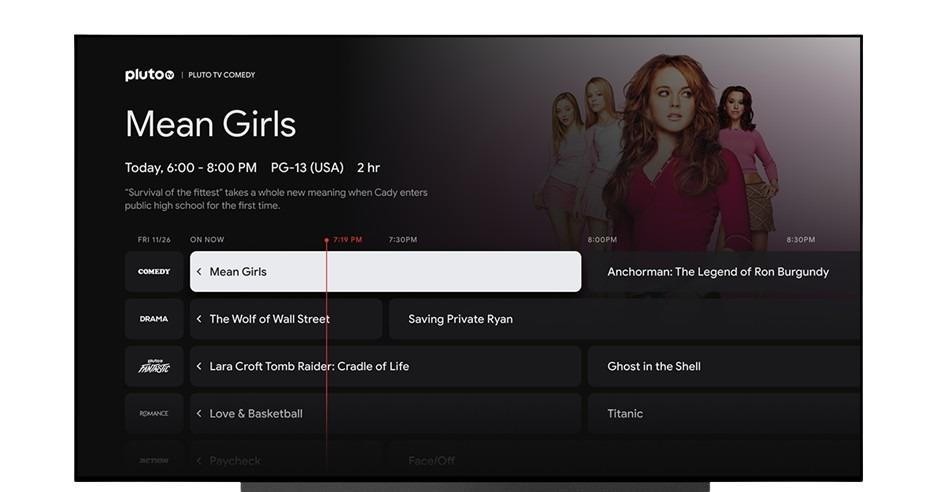
Google live TV

1. Set up your favorite channels: Open the Google TV interface and navigate to the Live tab. Scroll through the available channels and find your favorites. You can use the “Add to Favorites” option to include them in a separate section for quick access.

2. Customize the channel lineup: You can personalize the Live tab by adding or hiding specific channels. To do this, select the three-dot menu icon on a channel card and choose “Add to Favorites” or “Hide Channel” based on your preference.

3. Manage streaming apps: The Live tab supports various streaming apps. Ensure that you have the desired apps installed on your device. If you’re missing any, visit the Google Play Store and download them. Popular apps include Haystack News, Plex, Pluto TV, Tubi, YouTube TV, Sling TV, and Philo.

4. Explore free streaming channels: Google TV provides over 70 built-in free streaming channels. Scroll through the Live tab to discover and explore these channels. They cover a range of content genres and can offer a great selection of shows and movies without requiring a subscription.

5. Use an antenna for over-the-air channels: If you have a smart TV with Google TV software built-in, you can connect an antenna to access free over-the-air channels. Plug in your antenna and use the Live tab to navigate and watch these channels alongside streaming options.

6. Discover personalized recommendations: Google TV learns your viewing preferences over time and provides personalized recommendations based on your interests. Check the “For You” section within the Live tab to find content suggestions tailored to your tastes.

7. Explore sports and news: The Live tab is not limited to entertainment channels. You can find dedicated sections for sports and news as well. Browse through these categories to access live sports events, news broadcasts, and more.

By utilizing these tips, you can make the most of Google TV’s Live tab and have a unified channel guide for both streaming services and live TV channels, enhancing your entertainment experience.


You Might Also Like

The “VIROSH” Wedding: Rashmika Mandanna and Vijay Deverakonda

Allu Arjun’s film Pushpa 2 in Japan has slower than expected despite of promotions

Imtiaz Ali backs Rahman despite several controversies

Tere Ishk Mein lawsuit from Eros

John Abrahm’s fitness secrets

TAGGED: Express hunt, Google TV, India, Steps to take, Topnews
Rudrakshi Gupta June 7, 2023
Share this Article
Facebook Twitter Whatsapp Whatsapp Email Copy Link Print
What do you think?
Love0
Sad0
Happy0
Sleepy0
Angry0
Surprise0
Wink0
Cry0
Previous Article Menopausal Vascular Fat: A Key Player in Protecting Against Dementia
Next Article Stevia: A Natural and Healthy Alternative to Sugar
Leave a comment Leave a comment

Leave a Reply Cancel reply

You must be logged in to post a comment.

- Advertisement -
Ad imageAd image

Latest News

Dionne Unveils “In The Spotlight” – A Collection Made For Every Stage Of The Social Calendar
Brand Stories August 21, 2026
Tanishka Chugera: Beyond Goodbye, A Daughter’s Journey Through Love, Loss and Healing
Brand Stories August 14, 2026
My Legal Pal Marks a Growing Milestone Advising Founders and Companies Across India, and Foreign Businesses Establishing Operations Here
Brand Stories August 14, 2026
When an Algorithm Starts Shaping How We See Ourselves: Niveditha on My Algorithm Thinks I’m Fat
Brand Stories August 12, 2026
Follow US

© 2022-2026 Express Hunt . All Rights Reserved.

  • About Us
  • Privacy Policy
  • Contact Us
  • My Bookmarks
  • Editorial Policy

Removed from reading list

Undo
Welcome Back!

Sign in to your account

Lost your password?
